
Master the basics: how cryptography works for developers
Cryptography is the art of secret communication. At its heart, it’s all about turning a readable message into a jumbled, unreadable one, making sure only the right person can ever unscramble it. For a developer, mastering this isn't just an academic exercise; it's a critical skill that directly impacts your hireability and career growth. Think of it as a system of digital lockboxes and keys designed to keep information safe—and a key to unlocking your next job offer.
Why Cryptography Is Your Career Superpower
Here’s the thing: understanding cryptography isn't just for niche security roles anymore. It’s a core skill that hiring managers look for across the board. Whether you’re a software engineer, a cybersecurity pro, or diving into blockchain, being able to talk intelligently about crypto principles gives you a huge leg up in a technical interview.
This knowledge shows you get the bigger picture—system security, data integrity, and privacy. Those are the qualities that make a candidate stand out. Think of this guide as your playbook for turning complex theory into confident, practical answers that land you the job.
From Ancient Secrets to Modern Security
The impulse to hide information is as old as civilization itself. We’re talking over 3,900 years of history here, with early forms popping up in ancient Egypt and Mesopotamia. Around 100 BC, Julius Caesar used his now-famous Caesar cipher to protect military orders by simply shifting the letters of the alphabet. It was basic, sure, but it laid the groundwork for the core idea: transform data to keep it secret. You can get a great overview of these early methods on IBM's history of cryptography page.
Of course, today’s digital world runs on much more sophisticated methods, but the goal is identical: protect the data. This makes it an absolutely critical skill for anyone building software today.
Connecting the Dots to Your Next Job
A solid grasp of cryptography lets you build applications that are more secure, resilient, and trustworthy—which is exactly what top employers want. When you understand the fundamentals, you can contribute meaningfully to conversations about system design, data protection, and threat modeling, marking you as a senior-level thinker.
Here’s how this knowledge directly translates to your career:
- Ace Technical Interviews: You'll be able to confidently explain the difference between symmetric and asymmetric encryption, what hashing is for, and how digital signatures work. These are no longer "nice-to-have" questions; they're foundational.
- Build Better Software: You’ll write code that implements security correctly, protecting user data and avoiding common, career-damaging pitfalls.
- Contribute to High-Stakes Projects: You become an indispensable part of teams working on financial tech, personal data, or blockchain systems where a single mistake can have massive consequences.
By mastering the "how" and "why" behind cryptography, you aren't just learning another technical skill. You're building a career advantage that makes you a more competent and marketable engineer.
This knowledge is especially crucial in the rapidly growing Web3 space. For more on building a career in this field, check out the resources and job openings on our Blockchain Jobs blog.
Now, let's get into the core components you'll need for your next interview.
Cryptography Core Concepts for Your Interview
Before we dive deep, let's establish a solid foundation. These are the absolute must-know concepts you'll encounter in any technical discussion about cryptography. The table below is your quick-reference cheat sheet for interviews.
| Concept | Primary Goal | Simple Analogy | Interview Talking Point |
|---|---|---|---|
| Symmetric Encryption | Confidentiality (Secrecy) | A single, shared key for a physical lockbox. Both the sender and receiver use the exact same key to lock and unlock it. | "It's fast and efficient for bulk data, but key distribution is the main challenge. The core problem is how you securely share the key in the first place." |
| Asymmetric Encryption | Confidentiality & Authentication | A public mailbox with two keys. Anyone can drop a letter in (public key), but only you have the private key to open it. | "It solves the key distribution problem of symmetric encryption. It's crucial for secure communication over the internet, like in a TLS handshake, and for digital identities." |
| Hashing | Integrity (Data hasn't been tampered with) | A unique digital fingerprint for data. If even one pixel in a photo changes, the entire fingerprint changes completely. | "It's a one-way function; you can't reverse a hash to get the original data. I'd use it for password storage with a salt or for verifying file integrity." |
| Digital Signatures | Authentication, Integrity & Non-repudiation | Like a handwritten signature on a contract, but for digital documents. It proves who sent the message and that it wasn't altered. | "It combines hashing with asymmetric encryption. The sender signs a hash of the message with their private key, and anyone can verify it with their public key. This proves both authenticity and integrity." |
Having these four pillars down is non-negotiable. They form the basis for almost every secure system we use, from sending an email to signing a blockchain transaction.
Symmetric Versus Asymmetric Encryption Explained
To really get a handle on how cryptography works in a way that’ll boost your career, you need to master its two foundational models: symmetric and asymmetric encryption. In any technical interview for a software or security role, being able to clearly explain the difference, the trade-offs, and where each one shines is non-negotiable. Think of this as the bedrock of your practical knowledge.

Let’s break them down with some simple, interview-friendly analogies that show you grasp the core concepts, not just the textbook definitions.
Symmetric Encryption: The Shared Key Safe
Imagine you and a trusted colleague need to share a secure safe. You both get a copy of the exact same physical key. You use your key to lock the safe, and your colleague uses their identical key to unlock it. That’s the core idea behind symmetric encryption.
It relies on a single, shared secret key for both encrypting (locking) and decrypting (unlocking) data. This model is incredibly fast and efficient, which makes it perfect for encrypting large volumes of information, like video streams, huge database backups, or the files on your hard drive.
Interview Insight: When asked about symmetric encryption, always lead with its speed as the main advantage. But the killer follow-up is to immediately mention its biggest challenge: key distribution. How do you securely get that single, shared key to the other person in the first place without someone intercepting it? This shows you understand practical limitations, not just theory.
That key distribution problem is a critical point. It shows you understand the practical limitations of the model and why its counterpart even exists. It’s the "Achilles' heel" of symmetric systems.
Asymmetric Encryption: The Public Mailbox
Now, picture a public mailbox with your name on it. Anyone in the world can find this mailbox and drop a letter into its slot. But—and this is the key part—only you have the unique private key that can open the mailbox and read the letters. This is asymmetric encryption in a nutshell.
This model, often called public-key cryptography, uses a pair of mathematically linked keys:
- A Public Key: You share this one openly. Anyone can use it to encrypt a message that only you can read.
- A Private Key: This key is your secret. You never share it. It's the only key that can decrypt messages that were locked with your public key.
This setup brilliantly solves the key distribution problem. There's no need to secretly pass a key back and forth; you can shout your public key from the rooftops without any risk.
The whole field of modern cryptography changed in the 1970s with this idea. In 1976, Whitfield Diffie and Martin Hellman published their groundbreaking paper, "New Directions in Cryptography," which introduced the concept. Soon after, the RSA algorithm was created by Ronald Rivest, Adi Shamir, and Leonard Adleman, giving us the first practical way to do this. Today, AES is the global standard for symmetric encryption, trusted by everyone from banks to governments. You can learn more about this important history of encryption on GIA's website.
Answering The Key Interview Question: When to Use Which
In a system design interview, a hiring manager might hit you with: "Explain when you would choose AES over RSA." This isn't a trick question. It’s a test of your practical chops. Your answer shows if you can make smart architectural decisions based on real-world trade-offs.
Here’s a simple way to frame your response:
| Feature | Symmetric Encryption (e.g., AES) | Asymmetric Encryption (e.g., RSA) |
|---|---|---|
| Key Management | Uses one shared secret key. | Uses a pair of keys (public/private). |
| Primary Advantage | Extremely fast and efficient. | Solves the key distribution problem. |
| Primary Disadvantage | Secure key exchange is difficult. | Computationally slow and expensive. |
| Ideal Use Case | Encrypting large amounts of data at rest or in transit. | Securely exchanging keys and verifying identities. |
The best answer is that you almost always use both. Real-world systems like TLS/SSL (the lock icon in your browser) use a hybrid approach. They start with slow asymmetric encryption just long enough to securely agree on a fast, single-use symmetric key.
Once that shared key is established, they switch over to speedy symmetric encryption for the rest of the conversation. This gives you the best of both worlds: the secure key exchange of asymmetric and the high-speed data protection of symmetric. Demonstrating this understanding proves you're ready for real-world engineering challenges.
Ensuring Data Integrity with Hashing and Digital Signatures
So far, we've focused on keeping information secret. But that’s only half the battle. Cryptography is just as crucial for proving that data is authentic and hasn't been tampered with. This is where hashing and digital signatures come into play, shifting the focus from confidentiality to integrity.
For any developer, getting these concepts down cold is non-negotiable. They are the bedrock of everything from secure password storage to blockchain ledgers and safe software updates.

Being able to explain how hashing prevents data tampering during an interview shows more than just textbook knowledge—it proves you know how to build systems people can actually trust.
Hashing: The Digital Fingerprint
Think of a cryptographic hash function as a way to create a unique "digital fingerprint" for any piece of data. It doesn't matter if you're dealing with a simple text file or a massive application—the hash function will crunch it down into a short, fixed-length string of characters.
Take SHA-256 (Secure Hash Algorithm 256-bit), one of the most common hashing algorithms. It takes any input and spits out a 256-bit string. The process is deterministic, meaning the same input will always generate the exact same hash.
But here’s the magic: it’s a one-way street. You can easily generate a hash from a file, but you can't reverse-engineer the file from its hash. This one-way property is what makes it the perfect tool for verifying that nothing has changed.
Interview Insight: A concept that often comes up is collision resistance. This just means it should be practically impossible to find two different files that produce the exact same hash. If an attacker could create a malicious file with the same hash as a legitimate one, they could trick a system into accepting it. Mentioning collision resistance shows you're thinking about potential attack vectors.
So, What Are Digital Signatures?
Hashing tells us if data has changed, but it doesn't tell us who it came from. For that, we need digital signatures. A digital signature is the cryptographic equivalent of a handwritten signature on a legal document—it proves who the sender is and that the contents are exactly as they intended.
This is where things get clever, as digital signatures elegantly combine hashing with the asymmetric encryption we talked about earlier. Interviewers love asking about this process because it connects several core concepts.
From a developer’s point of view, here’s how it unfolds:
- Hash the Message: First, the sender takes the message they want to send and runs it through a hash function to get its unique digital fingerprint.
- Sign with the Private Key: Next, the sender takes their own private key and uses it to encrypt that hash. The result is the digital signature.
- Send the Data: Finally, the sender attaches this signature to the original, unencrypted message and sends both to the recipient.
How a Digital Signature Gets Verified
When the message arrives, the recipient can verify its authenticity and integrity in a few straightforward steps.
- First, they take the sender's public key and use it to decrypt the digital signature. This reveals the original hash that the sender created.
- Separately, they take the message they received and run it through the exact same hash function to generate a brand-new hash.
- Then comes the moment of truth: they compare the two hashes.
If they match perfectly, it's airtight proof of two critical things:
- Authenticity: The message had to have been signed by the sender, because only their private key could have created a signature that their public key could decrypt.
- Integrity: The message wasn't altered one bit during its journey. If even a single character had changed, the new hash would be completely different.
This powerful duo of hashing and asymmetric keys is what builds trust in digital interactions, underpinning everything from secure software updates to the transactions that power the entire blockchain ecosystem.
Understanding the Web of Trust with PKI
We've established how asymmetric keys can create a digital identity. But how does your browser instantly know it can trust the public key of a website you've never visited? The magic behind that is Public Key Infrastructure (PKI).
Think of PKI as the internet's global notary service. It's the system that works behind the scenes to make sure the server you’re connecting to is exactly who it claims to be.
This is the bedrock of secure communication online, and if you're aiming for a senior engineering or security role, you absolutely need to know it inside and out. Being able to explain how this infrastructure works shows you can design reliable systems and get to the root of complex connection issues. It's a non-negotiable skill for roles that deal with digital identity, like those you'd find in specialized software engineer identity and access management positions.
Certificate Authorities: The Digital Notaries
The whole system hinges on Certificate Authorities (CAs). These are highly trusted organizations—think DigiCert or Let's Encrypt—that act as the notaries. Their job is to issue digital credentials that verify an identity online. Before a CA gives a website a certificate, it puts the applicant through a rigorous vetting process to prove they actually own the domain they're asking for.
This process is everything. A CA's entire business is its reputation. If they get sloppy and start issuing certificates to bad actors, browsers and operating systems will swiftly blacklist them, and their authority evaporates overnight.
Once the vetting is complete, the CA issues a digital certificate (specifically, an X.509 certificate). This isn't just a random file; it's a standardized, cryptographically signed document that links a specific public key to an identity, like yourbank.com.
Think of a digital certificate like a government-issued passport. It has your photo (the public key), your name (the domain), an expiration date, and the all-important official stamp from a trusted authority (the CA's digital signature). Using this analogy in an interview makes the concept instantly clear.
Following the Chain of Trust
Your browser doesn't just blindly trust a certificate from any random website. Instead, it comes with a pre-installed list of highly reputable "Root CAs." This is what creates a chain of trust. A Root CA can sign certificates for an Intermediate CA, which can then sign the certificate for an individual website.
When you connect to a secure website, your browser runs a series of checks that are a classic interview question. Here’s what it does:
- Check the Signature: It takes the public key of the CA that issued the website’s certificate and uses it to verify the signature. If it checks out, it means a trusted CA is vouching for this site.
- Verify the Chain: It then follows this chain of signatures all the way back up the ladder until it finds a Root CA that’s already in its trusted list. If any link in that chain is broken or signed by an untrusted party, the connection is rejected.
- Confirm the Details: Finally, it makes sure the domain name in the certificate matches the site you’re actually visiting and checks that the certificate hasn’t expired or been revoked.
If all these steps pass, you get the little padlock icon in your address bar. That’s your signal that the cryptographic link is secure. This entire PKI system is what allows trust to scale across the whole internet, enabling secure e-commerce, banking, and private communication without us having to manually verify every public key we come across.
Putting Cryptography to Work in Modern Technology
Knowing the theory is one thing. Being able to connect it to the technologies that hiring managers actually care about? That’s what gets you the job. This is where we bridge the gap, moving from abstract concepts to the real-world systems you'll be asked about in an interview. From securing your web browser to signing a Bitcoin transaction, these cryptographic primitives are the hidden engines of the digital world.
The jump to modern, computer-based cryptography really kicked off in the 20th century. During World War II, the German Enigma machine was a marvel of electromechanical encryption. But the real shift came later with algorithms like the Data Encryption Standard (DES). Developed by IBM and adopted by the U.S. government in 1977, DES formalized the move from clunky physical machines to pure software, changing the game completely.
Securing the Web with TLS and SSL
You see that little padlock icon in your browser? That’s the end result of a beautifully orchestrated cryptographic dance. It's called Transport Layer Security (TLS)—the modern successor to SSL—and it’s a perfect case study in hybrid encryption.
If a hiring manager asks how you'd secure a web app, walking them through the TLS handshake is a killer answer. It shows you know how the pieces fit together.
- The Handshake: Your browser reaches out to a server and asks for its digital certificate. This kicks things off with asymmetric encryption.
- Key Exchange: Your browser then creates a brand new symmetric key, encrypts it with the server's public key (from the certificate), and sends it over. Only the server can decrypt this message with its private key.
- Secure Session: Voilà! Both sides now share the same secret symmetric key. They immediately switch to a fast symmetric algorithm like AES for the rest of the conversation, encrypting all the data that flows back and forth.
This hybrid approach delivers the best of both worlds: the robust security of asymmetric crypto for the initial key exchange, and the raw speed of symmetric crypto for the heavy lifting of data transfer.
Blockchain and the Revolution of Trust
Blockchain is probably one of the most visible applications of cryptography today. If you're interviewing for a Web3 role, having a rock-solid grasp of this is absolutely essential. Many job descriptions, like this one for a software engineer in blockchain security, list it as a core requirement.
Here’s a quick breakdown of how crypto makes it all work:
- Immutable Ledgers: Blockchains rely on cryptographic hashing (typically SHA-256) to chain blocks of records together. Each new block contains the hash of the one before it, creating a verifiable, tamper-proof link. If someone tried to alter a transaction in an old block, the hash would change, and the entire chain from that point forward would break. The network would instantly spot the fraud and reject it.
- Transaction Authorization: When you send crypto, you're not actually sending files. You're using your private key to create a digital signature for a transaction message. This signature is mathematical proof that you—and only you—authorized that payment. Anyone on the network can then use your public key to confirm the signature is valid, all without your private key ever being revealed.
In an interview, it's powerful to frame blockchain as a system built on cryptographic proofs. Hashing provides proof of integrity, while digital signatures provide proof of ownership. This shows you get the "why" behind the technology, not just the "what."
The diagram below gives you a sense of the Public Key Infrastructure (PKI) that underpins trust on the internet and, by extension, in many blockchain systems.
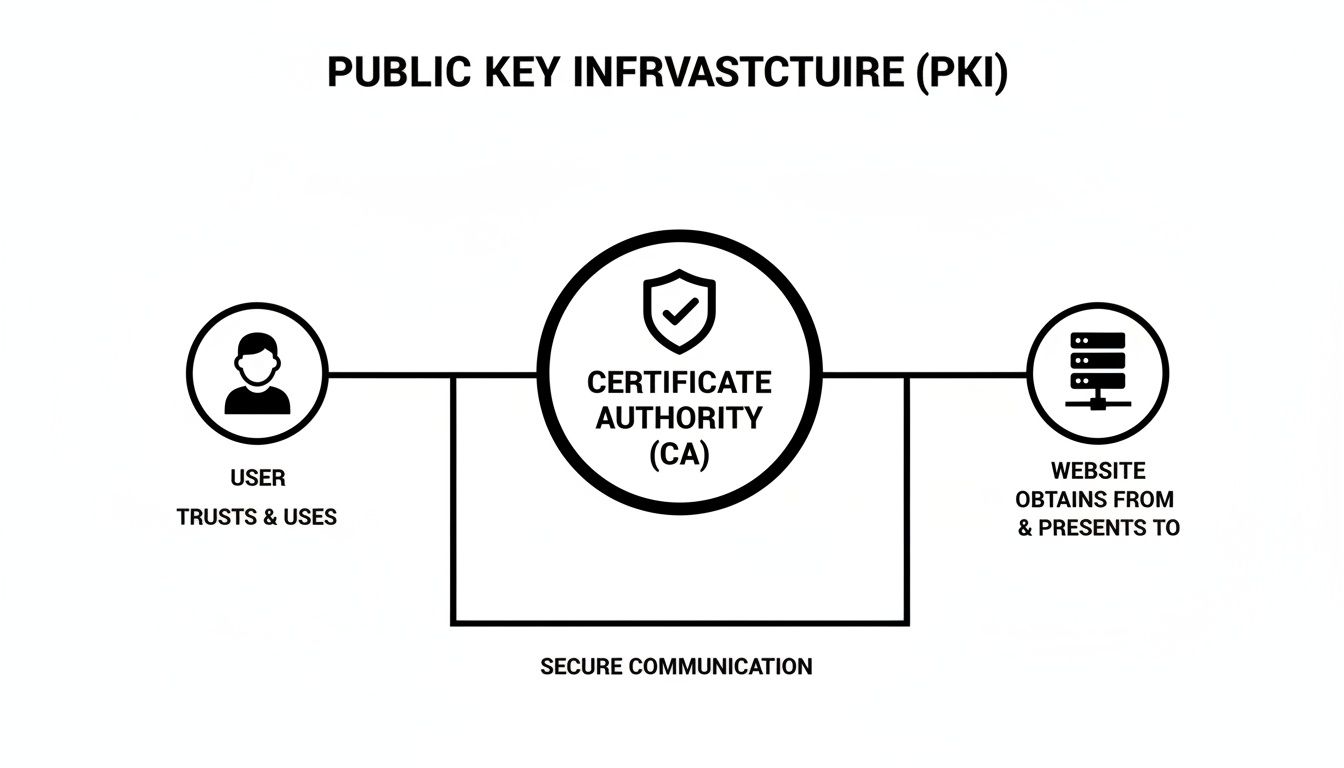
This shows how Certificate Authorities (CAs) act as trusted referees, verifying identities and issuing the digital certificates that connect public keys to real-world entities.
Efficient Security for Mobile and IoT
As our devices get smaller and less powerful, our cryptography has to get smarter. Traditional algorithms like RSA are workhorses, but they need massive key sizes to stay secure, which chews through battery and processing power. That’s a non-starter for a smartwatch, a smart home sensor, or any other resource-constrained IoT device.
Enter Elliptic Curve Cryptography (ECC).
ECC is an approach to asymmetric cryptography that delivers the same security as RSA with dramatically smaller keys. For instance, a 256-bit ECC key provides roughly the same security as a 3072-bit RSA key.
That’s a huge deal. It means faster calculations, lower energy consumption, and a smaller memory footprint—all make-or-break factors for mobile and embedded systems. Being able to discuss the trade-offs between RSA and ECC shows an interviewer you can think like a system architect, choosing the right tool for the constraints of the job.
Comparing Cryptographic Algorithms for System Design
When you're in a system design interview, choosing the right cryptographic algorithm isn't just about security; it's about balancing trade-offs between speed, key size, and the specific problem you're trying to solve. The table below breaks down some of the most common algorithms you'll encounter.
| Algorithm | Type | Typical Key Size | Relative Speed | Primary Use Case |
|---|---|---|---|---|
| AES | Symmetric | 128, 192, 256-bit | Very Fast | Encrypting large volumes of data (files, network traffic). |
| RSA | Asymmetric | 2048, 3072, 4096-bit | Slow | Key exchange (TLS handshake) and digital signatures. |
| ECC | Asymmetric | 256, 384, 521-bit | Moderate | Mobile/IoT key exchange and signatures; cryptocurrencies. |
| SHA-256 | Hash Function | N/A (256-bit output) | Very Fast | Data integrity checks, password storage, blockchain. |
| EdDSA | Signature | 256-bit | Fast | High-performance digital signatures. |
Knowing this table is about more than just memorization. It’s about being able to justify your choices. Explaining why you'd pick ECC over RSA for a mobile app or why AES is the right choice for encrypting a large database demonstrates a level of practical expertise that goes far beyond textbook definitions.
Answering Common Cryptography Interview Questions
You've got the concepts down and you see how they apply in the real world. Now it's time to put it all together. Think of this as your prep sheet for the technical interview, helping you turn that knowledge into confident, clear answers that show you're ready for the role.
The goal here isn't just to be correct; it's to be articulate. A great answer proves you can communicate complex ideas to your future teammates—a skill every hiring manager is looking for.
What Is the Difference Between Encryption and Hashing?
This is probably one of the most fundamental questions you'll get, and nailing the answer sets a strong tone for the rest of the interview. It's a direct test of whether you grasp the core goals of confidentiality versus integrity.
Start by framing their purposes. Encryption is a two-way street built for confidentiality. You use a key to lock data, and anyone with the right key can unlock it to get the original information back. It’s like putting a sensitive file in a safe.
Hashing, on the other hand, is a one-way function all about integrity. It takes any input and crunches it down into a unique, fixed-size "fingerprint." The critical detail is that you can't reverse the process to get the original data. It's for proving something hasn't been tampered with, not for hiding it.
Model Answer: "Encryption is a two-way function for confidentiality. I’d use something like AES to encrypt a user's credit card number before sending it across a network. The goal is to keep it secret, and the receiving system uses a key to decrypt it. Hashing is a one-way function for integrity. I'd use SHA-256 to create a fingerprint of a user's password before storing it. You can't reverse the hash to see the password, but you can check it by hashing their login attempt and seeing if the fingerprints match. This confirms the password is correct without ever storing the plaintext."
This kind of response shows you don't just know the definitions; you know exactly when and why you'd use each one in a real system.
Why Is Salting Passwords So Important?
This is a natural follow-up to hashing that digs into practical security. It’s a great chance to show you're thinking about common attack vectors and how to stop them. A good answer here proves you're focused on building robust systems, not just checking a box.
The first thing to mention is the threat it neutralizes: rainbow table attacks. A rainbow table is a massive, pre-computed dictionary that maps common passwords to their hashes. If an attacker gets ahold of a database of unsalted password hashes, they can just look them up in their table and find the original passwords almost instantly.
Salting makes that whole strategy useless. A salt is just a unique, random string added to each user's password before it's hashed. Because every user gets a different salt, two people with the same password (like "Password123") end up with completely different hashes in the database.
This forces an attacker to create a new rainbow table for every single user, which is so computationally expensive it's basically impossible.
- Key takeaway: Salting ensures identical passwords produce unique hashes.
- Result: Pre-computed rainbow tables are rendered useless.
- Demonstrates: You understand modern, practical password security.
Bringing this up shows you know how to build systems that stand up to real-world, large-scale breach attempts.
Can You Explain How Hybrid Encryption Works?
This question tests your ability to connect different crypto concepts into a working system. It’s a classic for roles in network security or systems design because this is exactly how TLS/SSL keeps our internet traffic safe.
The best way to explain it is to start with the problem it solves. Asymmetric encryption (like RSA) is great for secure key exchange but way too slow for encrypting large amounts of data. Symmetric encryption (like AES) is lightning-fast but suffers from a major headache: how do you securely share the key in the first place?
Hybrid encryption cleverly combines the two, getting the best of both worlds.
Here’s a simple, step-by-step breakdown that works great in an interview:
- A client connects to a server. The server sends back its public key, usually inside a digital certificate.
- The client then generates a brand new, one-time-use symmetric key, often called a session key. This is what will be used for the bulk of the communication.
- Here’s the magic: the client takes the server's public key (asymmetric) and uses it to encrypt the session key (symmetric) before sending it back.
- The server uses its corresponding private key to decrypt the message, revealing the session key. Now, both parties have the same secret symmetric key.
- From that point on, they switch to the much faster symmetric algorithm (like AES) to encrypt and decrypt all their messages for the rest of the session.
This approach uses the slow-but-secure method for the most critical step—exchanging the key—and the fast method for everything else.
How Does Quantum Computing Threaten Modern Cryptography?
This is a forward-looking question designed to see if you're keeping up with the evolution of the field. It’s particularly relevant for roles focused on long-term security architecture or cutting-edge R&D.
The biggest threat from quantum computers is aimed squarely at asymmetric cryptography. The security of algorithms like RSA and ECC relies on math problems that are virtually impossible for today's computers to solve, like factoring enormous prime numbers.
The problem is, a quantum algorithm called Shor's algorithm is specifically designed to solve these types of problems with terrifying efficiency. A powerful enough quantum computer running Shor's algorithm could break today's public-key encryption standards, undermining everything from online banking to secure state communications.
Interestingly, symmetric algorithms like AES are considered much safer against quantum attacks. They aren't completely immune, but their security can be shored up by simply using larger key sizes (for example, moving from AES-128 to AES-256).
The industry's response to this looming threat is the development of Post-Quantum Cryptography (PQC). These are entirely new cryptographic algorithms, currently in the process of being standardized, that are built to be secure against attacks from both classical and quantum computers. Mentioning PQC shows you're not only aware of the problem but also the solutions already on the horizon.
Ready to put your cryptography skills to the test in a new role? At Blockchain Jobs, we connect top talent with leading companies in the Web3 space. Find your next opportunity in engineering, security, product, and more.